


Personalizing outbound for a whole market means deciding in advance how much human research each contact gets, so a small team can send over 1,000 relevant messages a month without writing one generic email. The model on this page splits contacts into three tiers: about 15 minutes of research per Tier 1 account, 90 seconds of checking per Tier 2 contact, and segment-level copy for Tier 3. On a plan of 1,500 new contacts a month that comes to roughly 39 hours of work, against about 250 hours if every contact got 10 minutes by hand.
Key Findings
- Personalization for a large list is a time budget. Decide how many minutes each contact gets before anyone writes copy.
- Three tiers cover most B2B lists: account-level research, signal-triggered templates, and segment-level copy.
- In the worked model, Tier 1 is 10 percent of contacts and about half the hours. Tier 3 is 60 percent of contacts and a fifth of the hours.
- A buying signal earns a Tier 2 template only when it changes the angle, the sender or the send date.
- Promote accounts the day a signal fires and demote them when it goes stale, so tiers stay live.
- Judge each tier on positive reply rate and meeting quality. Primal ran evergreen plus signal campaigns at an 8 percent positive reply rate.
- Reachly builds and runs this model as part of its outbound lead generation services.
What does personalization mean when you send to thousands of contacts?
For a list of a few dozen accounts, personalization is simple: someone researches each one and writes the email. Past a few hundred contacts a month, that stops being possible, and most teams fall back to mail merge: a first name, a company name, maybe a line about a recent post. The prospect sees through it in one read.
The workable version sits between those two. You decide which accounts deserve real research, which ones get a message built around a specific event at the company, and which ones get copy written for their segment. Each contact still receives a message with a reason to exist. The difference is where the human hours go. Personalization is one step in the wider prospecting process, which covers the targeting and research that come before it.
The commercial case for getting this right is well documented. Companies that excel at personalization generate 40% more revenue from those activities than average players, according to Contentful's write-up on scaling personalization. That figure comes from consumer marketing, but the mechanism carries over to outbound: relevance earns attention, and attention is what a cold message is short of.
Where the time actually goes
The expensive part of personalization is the research, and writing is a small share of it. Finding the trigger, checking it is current, mapping who owns the problem and choosing the angle take far longer than typing the email. So the useful question is how many minutes of research each contact gets. Once that number is set per tier, the rest of the system follows from it.
A good test for any line you call personalized: could it be sent to five other companies with no edits? If yes, it is decoration, and it belongs in a lower tier or out of the email.
How does the three-tier model work?
Every contact on the monthly plan lands in one of three tiers. The tier sets the research time, what gets personalized, and which channels carry the sequence. The table is the whole model on one screen.
| Tier | Who qualifies | Research time | What gets personalized | Share of contacts |
|---|---|---|---|---|
| Tier 1: account research | Accounts where one deal changes your quarter, or a small TAM you cannot afford to burn | About 15 min per account, plus 3 min per contact | The account story, the trigger, and a role-specific line for each of 2 to 3 committee members | About 10% |
| Tier 2: signal templates | ICP accounts with a live buying signal, such as hiring, funding or headcount growth | About 90 seconds per contact to check the signal and the generated line | One opener built from the signal, plus the angle that signal implies | About 30% |
| Tier 3: segment copy | ICP accounts with no live signal | About 1 hour per segment version, plus a 1 in 10 spot check | Copy written for the role and industry segment, with no per-contact research | About 60% |
Tier 1: account-level research
Tier 1 is where a person reads the company. They look for what changed in the last quarter, who owns the problem you solve, and which two or three people inside the buying committee need to hear about it. The output is one account narrative plus a line for each role. Keep this tier small on purpose. The number of Tier 1 accounts is capped by research hours, and adding accounts past that cap turns research into skimming.
Tier 2: signal-triggered templates
Tier 2 is where most of the reach comes from. Each buying signal gets its own template, and the only per-contact variable is the line that names the signal. Enrichment tools pull the signal automatically, and a person spends about 90 seconds confirming it is real and that the generated line reads well. The research was done once, when the template for that signal was written.
Tier 3: segment-level copy
Tier 3 accounts fit your ICP but show no current trigger. They get copy written for their segment, for example heads of marketing at B2B software companies with 50 to 200 staff. The message speaks to what that role in that segment typically deals with. It is honest about being a segment message, which reads far better than a fake compliment.
Promotion and demotion rules
Tiers only work if they move. When a Tier 3 account shows a new signal, it moves to Tier 2 that day. When a Tier 2 account's signal goes stale, or a sequence finishes with no reply, it drops back. Tier 1 is reviewed monthly against the research budget. Without these rules, the tiers freeze and Tier 2 fills up with signals from last quarter.
How many hours does this take each month?
Here is the worked model for 1,500 new contacts a month. The inputs are planning assumptions, stated so you can replace them with your own timings. The shape of the result holds across most inputs we have tried: the top tier takes about half the hours for a tenth of the contacts.
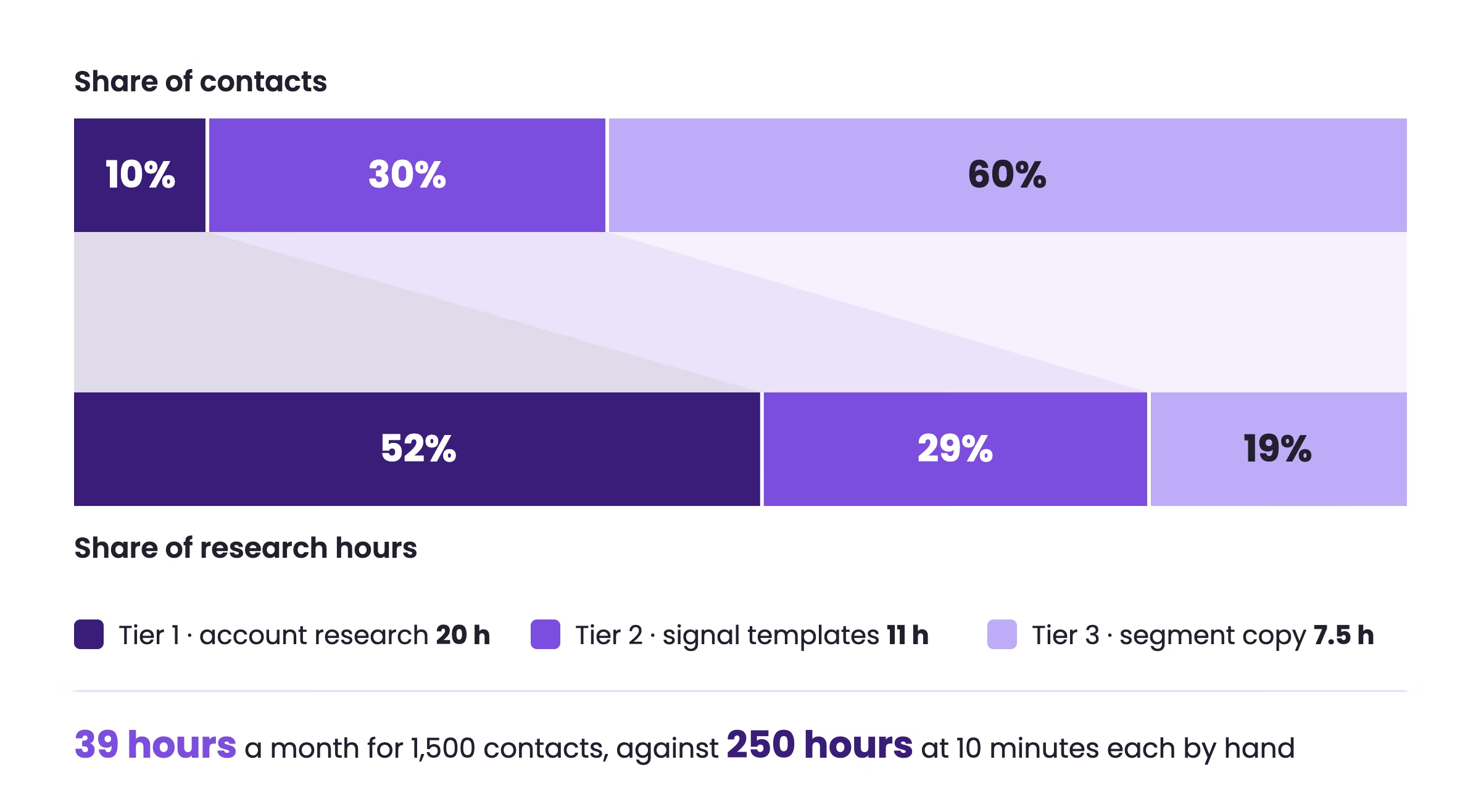
Tier 1 is 50 accounts with three contacts each, so 150 contacts. At 15 minutes per account and 3 minutes per contact, that is 1,200 minutes, or 20 hours. Tier 2 is 450 contacts at 90 seconds each, which comes to about 11 hours. Tier 3 is 900 contacts: six segment versions at an hour each, plus a one-minute check on every tenth email, for 7.5 hours.
The total is about 39 hours a month, or under 10 hours a week. The same 1,500 contacts at 10 minutes of hand research each would take 250 hours, which is more than one full-time person. Use the worksheet below to run the numbers for your own plan.
INPUTS (replace with your own)
  New contacts per month (N)                     1,500
  Tier 1 accounts (A1)                           50
  Contacts per Tier 1 account (c)                3
  Tier 2 contacts, live signal (T2)              450
  Tier 3 segment versions (S)                    6

TIMINGS (minutes)
  Research per Tier 1 account                    15
  Tailoring per Tier 1 contact                   3
  Checking per Tier 2 contact                    1.5
  Writing per Tier 3 segment version             60
  Spot check per sampled Tier 3 email            1   (sample 1 in 10)

FORMULAS
  Tier 1 contacts  = A1 x c                                  = 150
  Tier 3 contacts  = N - (A1 x c) - T2                       = 900
  Tier 1 hours     = (A1 x 15 + A1 x c x 3) / 60             = 20.0
  Tier 2 hours     = (T2 x 1.5) / 60                         = 11.3
  Tier 3 hours     = (S x 60 + Tier 3 contacts / 10 x 1) / 60 = 7.5
  Total hours      = Tier 1 + Tier 2 + Tier 3                = 38.8
  Manual baseline  = N x 10 / 60                             = 250.0

CHECK
  If Tier 1 hours exceed your research budget, cut A1, keep c.
  If T2 falls under a quarter of N, add signal sources before adding volume.
Which accounts belong in which tier?
Tiering starts with a tight account definition. If the target market is loose, the wrong accounts enter the sequence, the wrong contacts get enriched, and the writer starts inventing relevance to fill the gap. Score each account on four layers before it gets a tier.
| Layer | What to check | What it decides |
|---|---|---|
| Firmographic fit | Industry, region, size, business model | Whether the account enters the plan at all |
| Motion fit | Team structure, market served, outbound maturity | Which angle the account can act on |
| Timing fit | Hiring, expansion, tool change, growth signals | Tier 2 if a signal is live, Tier 3 if not |
| Deal size and access | Likely contract value and reachable buying roles | Tier 1 if one deal moves your quarter and the committee is reachable |
A practical operating model starts with one unified customer-data layer, the approach McKinsey sets out in its technology blueprint for personalization. Stack data from LinkedIn Sales Navigator, Apollo, Crunchbase, company websites, job boards and your own CRM to answer one question per account: work it now, later, or not at all.
Clean the list before you tier it
A record marked verified by a data supplier is a clue. Email data goes stale, roles change, and catch-all setups muddy the picture, so re-verify before launch, especially when the list was built from several sources. If you are enriching fields before sequencing, our guide on B2B data enrichment covers the order of operations.
Four rules save campaigns. Match the account before the contact, or your CRM fills with reachable strangers. Keep role logic explicit: define who owns the pain, who feels it, and who can block the deal. Check recency by hand on edge cases. And store source confidence per field, so the team knows which data can control copy.
Which buying signals are worth a Tier 2 template?
A signal earns its own template when it changes what you say, who says it, or when you send it. Teams often collect triggers and then send the same email anyway, which wastes the enrichment spend. The strongest signals describe a change of state at the company, and the angle follows from that change.
| Signal | What it likely means | Tier 2 angle |
|---|---|---|
| Hiring first SDRs | Building outbound from scratch | Ramp time, list quality and reply handling |
| New sales leader | Pipeline creation is being reassessed | Current gaps and speed to first meetings |
| Funding round | Growth targets just went up | Hitting the new pipeline number without a long hiring cycle |
| Headcount growth | Capacity and tooling are under strain | Keeping quality while the team expands |
| Declining traffic or SEO ranking drops | Inbound is slowing | Replacing lost inbound pipeline with outbound |
| Market expansion or a new office | Entering a region with no pipeline | Building a first pipeline in the new market |
Those last rows are drawn from live campaigns. Primal's signal campaigns ran on hiring, funding, declining traffic and SEO ranking drops, and The Great Room's on headcount growth, hiring, funding, market expansion and proximity. Both are written up in the Primal case study and The Great Room case study. For prioritizing by intent, our breakdown of B2B intent data is the next read, and the wider system sits inside our signal based outbound playbook.
One primary trigger per message
More data can make the message worse. Feed Clay every enrichment source and cram four observations into the opener, and it reads like surveillance. Pick one primary trigger, and add one supporting detail only if it sharpens the case. If your team cannot explain why a field should change the angle, that field should not control copy. Here is the template shape we use for a Tier 2 signal.
SIGNAL: hiring first SDRs (live for 60 days from the job post)

Subject: {{first_sdr_role}} at {{company}}

Hi {{first_name}},

Saw {{company}} is hiring its first {{first_sdr_role}}.
The first 90 days of a new outbound team usually go on list
building and domain setup before a single meeting is booked.

We run that setup and the first campaigns while the new hire
ramps, so they inherit a working pipeline.

Worth comparing notes on how you are planning the first quarter?

PER-CONTACT CHECK (90 seconds)
  1. Job post still open and dated inside the window
  2. Contact owns the outbound hire, or reports to whoever does
  3. Opener reads naturally out loud
How do you keep one story across a buying committee?
B2B deals rarely close with one person. In Tier 1 especially, you are writing to several people with different incentives. The answer is one account narrative, split by role. Each person hears the same commercial story, framed around the consequence they care about.
| Stakeholder | What they care about | Same narrative, different wording |
|---|---|---|
| VP of Sales | Pipeline creation and rep productivity | "If you are building outbound coverage, weak data and inconsistent sequencing usually slow rep output." |
| RevOps | Process reliability | "If outbound volume is rising, routing, data freshness and handoff rules usually break first." |
| Founder or CEO | Commercial efficiency | "If the team is pushing into a new market, outbound needs to hold quality without heavy oversight." |
Keep the structure fixed and swap in if-then snippets based on data you trust. If the company is hiring sales reps, the opener speaks to expansion pressure. If they use HubSpot, the body mentions workflow fit. If the trigger is a new market, the call to action shifts toward testing a focused motion. The system picks the branch; nobody rewrites the whole message. For role-by-role cold email patterns, our cold email personalization playbook goes step by step.
AI belongs in your snippets, never in your full email. The signal makes the first line land. Saw you just raised your Series A with Sequoia leading. That one line does the personalization. Then you write the rest yourself, because buyers are tone deaf to AI slop. The signal is the edge. The hand-written body is the trust.

Where AI fits
AI copy gets uncanny fast when it writes too much of the message. Short, constrained snippet generation works far better than full-email generation. Use it for the signal line in Tier 2, subject line options, and role rewrites in Tier 1. Keep the approved narrative, role variants and signal templates in one shared place, because separate docs for sales, an agency partner and the founder lead to message drift within weeks.
How should each tier move through email, LinkedIn and calls?
A personalized email on its own is fragile. People miss emails, skim on mobile, and mean to reply and forget. Treating personalization as a cross-channel operating model is the shift Braze describes in its piece on cross-channel personalization. Run the channels in a fixed order, cold email, LinkedIn, cold calling, and give each tier a channel mix that matches its research budget.
| Day | Channel | Purpose | Tiers |
|---|---|---|---|
| Day 1 | Email 1 | Lead with the account trigger or segment problem | All |
| Day 3 | LinkedIn profile visit | Build recognition before the next touch | 1 and 2 |
| Day 4 | Email 2 | A different angle or a short proof point | All |
| Day 6 | LinkedIn connection request | Short, consistent with the email story | 1 and 2 |
| Day 8 | Call | Check urgency, routing, or find a better contact | 1 only |
| Day 11 | Email 3 | Close the loop with a direct, low-friction question | All |
| Day 14 | Call or LinkedIn message | Ask for a yes, no, later, or a referral | 1, plus 2 if engaged |
Timing should follow signal strength: a strong trigger justifies faster follow-up, a weak one lighter pressure. Tools like Smartlead for sending and mailbox management, HeyReach for the LinkedIn layer, and Clay for enrichment each handle one part. What matters more is one orchestration layer and one owner of the tier and sequence logic.
For the order of touches, the outbound sales strategy guide has a sample 14-day sequence across email, LinkedIn and calls.
How do you know the tiers are working?
Track positive reply rate per tier: interest, a redirect to the right person, a request for detail, or a willingness to talk. Out-of-office messages, unsubscribes and angry replies do not count. Opens tell you almost nothing. Meeting quality matters as much as reply rate, because a tier that books meetings with the wrong people is costing hours twice.
Tier 1 should outperform Tier 2, and Tier 2 should outperform Tier 3. If Tier 1 does not, the research is not changing the message and the hours are wasted. If Tier 2 lags Tier 3, the signals are stale or the templates are generic. Test one change at a time and keep a holdout group, a point made in McKinsey's piece on the first steps in personalization.
What the case studies show
Primal, a marketing services firm in Thailand, ran evergreen campaigns to CMOs and CEOs alongside signal-based campaigns. That is Tier 3 and Tier 2 in this model. The result was an 8 percent positive reply rate across campaigns, 85+ SQLs in six months and a 4.57x ROI. The Great Room, a premium co-working operator in Singapore and Australia, used the same evergreen plus signal structure and went from about two meetings a quarter to about two a month.
When a tier underperforms
Diagnose in a fixed order: account quality, then signal freshness, then role mapping, then narrative fit across channels, then call-to-action friction. Most weak campaigns turn out to be targeting problems, and rewriting the copy first hides that. The outbound lead generation overview shows where tiering fits in the wider motion, and our outbound lead generation services page covers how Reachly runs it end to end for clients.
Want the three tiers built and run for you?
Reachly maps your TAM, scores accounts into tiers, writes the signal templates and runs cold email, LinkedIn and cold calling until qualified meetings land on your calendar.
Book a call with Reachly
Personalization FAQ
What does personalization mean in B2B outbound compared with consumer marketing?
The phrase comes from consumer marketing, where platforms such as Adobe and Braze use it for software that picks content, offers and send times for each user from behavioral data. In B2B outbound the unit is the account rather than the individual user, and the decision is mostly human: how much research each account earns, and which trigger the message is built around.
Can you give me an example of personalizing a cold email?
Take a company that appointed a new head of marketing last month while its organic traffic fell. A generic opener says "I help companies like yours grow pipeline." A personalized one says "Congrats on the new role. Joining while search traffic is down usually means the first board update asks where pipeline will come from." Same offer, but the second version could only be sent to that one person.
How do I scale outbound without losing personalization?
Add volume to the lower tiers and keep the top tier fixed. New contacts should enter Tier 3 or Tier 2, while the Tier 1 count stays capped by the research hours you actually have. If the share of contacts with a live signal keeps shrinking as volume grows, add signal sources such as job boards or funding databases before adding more names.
What is the difference between personalization and customization?
In outbound, personalization changes the message: the opener, the angle and the proof you choose for one account. Customization changes what you sell: a different package, scope or price for that account. Most cold campaigns only need the first. Customizing the offer usually belongs later, once the prospect has replied and told you what they need.
Recommended service
Outbound Lead Generation Services
Reachly builds and runs the whole outbound motion across email, LinkedIn, and phone, and books qualified meetings on your calendar.










