

- LinkedIn shows an email address only when the member published one and you are already a first-degree connection, so most lookups start from the name and employer instead.
- Your own LinkedIn data export returns the email each first-degree connection had on file when they accepted you, as one free CSV.
- Six address patterns cover almost every B2B domain. Verify all six against one known employee and the pattern covers the whole company.
- For lists, a provider waterfall resolves contacts a single database has never seen. Published entry pricing runs from free at 50 credits a month to $99 a month for 5,000 verified credits.
- Keep bounce rate under 3%: verify inside 48 hours of send, cut role accounts and catch-all domains, and suppress prior bounces permanently.
- Reachly builds and runs the whole motion for you. See our LinkedIn outreach agency page.
You find LinkedIn emails with 12 methods that fall into three groups: four free checks on the profile itself, four search and pattern techniques that cost nothing but time, and four paid lookup routes that resolve a whole list at once. LinkedIn hands over an email address only when the member has published one and you are already a first-degree connection, which is why the other eleven methods exist. This guide covers all 12, the published cost of each tool, the legal rules that apply once you send, and the scrub that keeps a LinkedIn-sourced list under a 3% bounce rate.
TL;DR: Summary
- LinkedIn shows an email only when the member published one and you are a first-degree connection. Four free profile checks cover the rest of that minority: Contact info, the banner image, the About section and Featured.
- Your own LinkedIn data export is the largest free source of addresses. It returns the email each connection had on file when they accepted you, as one CSV.
- Google site search against a company domain and the six standard address patterns resolve most contacts without any paid tool, as long as you verify what you generate.
- For lists, a finder waterfall queries providers in sequence so a contact one database has never seen still resolves. Icypeas, LeadMagic and BetterContact stacked inside Clay is the standard build.
- Published entry pricing runs from free at 50 credits a month with Hunter and Skrapp to $99 a month for 5,000 verified finder credits with Findymail. Sales Navigator Core lists at $119.99 a month and returns no emails at all.
- The legal line sits on the send, not the lookup. GDPR legitimate interest plus an Article 14 notice, CAN-SPAM opt-outs inside ten business days, express or implied consent under CASL, and no automated scraping under LinkedIn's User Agreement.
- Reachly runs this as a managed service across cold email, LinkedIn and cold calling. See our LinkedIn outreach agency page.
Does LinkedIn show people's email addresses?
LinkedIn holds an email address for every member and publishes it to almost nobody. The field sits behind the Contact info link under the profile headline, and each member controls who sees it. The default keeps it to first-degree connections, and plenty of people restrict it further or never fill it in.
That produces a predictable pattern. Founders, consultants, recruiters and creators publish an address because inbound is part of their job. Heads of department at mid-market and enterprise companies generally do not, and they are usually the people an outbound campaign needs.
So the profile is a starting point rather than a source. What it reliably gives you is a full name, a current employer and a job title, and those three fields are enough for every other method below.
The address is one step in a longer process. Reachly's guide to sales prospecting techniques covers what comes after it, including LinkedIn-first prospecting, multichannel sequences and qualification.
How do you find LinkedIn emails for free?
Four checks, all free, all worth running before you spend a credit on anyone.
Method 1. The Contact info panel
Open the profile and click Contact info under the headline. When the member has shared an address, it appears here alongside their website, phone and birthday. One trap: many profiles list only the LinkedIn URL in that panel, so a line reading linkedin.com/in/firstname-lastname is not an email address and there is nothing else to find on the page.
Method 2. The banner image
Banner design has become a small marketing channel, and founders, consultants and agency owners regularly print an email address, a phone number or a booking link into the artwork. It takes a second to scan and it selects for people who want to be contacted, which makes it the highest-intent free source on the list.
Method 3. The About section and Featured
Scroll past the headline. A meaningful share of founder-led profiles close the About section with a line inviting direct contact and an address to use. The Featured carousel is worth a look too, because a lead magnet PDF or a media kit pinned there usually carries a contact address in its footer.
Method 4. Your own LinkedIn data export
This is the method most people never run. Go to Settings and Privacy, then Data privacy, then Get a copy of your data, then choose Want something in particular and select Connections. LinkedIn emails you an archive containing a CSV of your first-degree network with the email address each person had on file when they accepted your request.
A network of two thousand connections returns a few thousand rows in one download at no cost. Some addresses are personal rather than work, and some are stale, so the file still needs a verification pass before it goes near a campaign. The full walkthrough is in our guide to exporting LinkedIn contacts.
| Method | Works best on | What it costs | Limit |
|---|---|---|---|
| Contact info panel | Any profile, as a first check | Free, about 5 seconds | Only shows when the member published an address |
| Banner image | Founders, consultants, creators | Free, about 2 seconds | Rare outside personal-brand profiles |
| About and Featured | Founder-led and solo profiles | Free, about 15 seconds | Buried at the end of long profiles |
| Your LinkedIn data export | First-degree connections only | Free, arrives in minutes | Addresses can be personal or stale |
These four collapse the moment a campaign needs more than a handful of contacts. Checking a hundred profiles by hand is most of a working day, and the remaining eight methods exist because that arithmetic does not improve.
How do you find LinkedIn emails with Google search operators?
Google indexes both the public half of LinkedIn and the places people publish their address, which makes it two methods rather than one. The first finds the profile, the second finds the address.
Method 5. X-ray search to find the right profile
A site search against linkedin.com/in returns public profiles matching a title, a company and a location without using any LinkedIn search credits. It is the cheapest way to build a target list when you do not hold a Sales Navigator seat, and the results are stable enough to work from.
Method 6. Domain search to find the address
Once you have the name and the employer, search for the address itself. Conference speaker pages, press releases, GitHub commits, PDF reports, job postings and company team pages all leak work addresses, and Google has indexed most of them. Searching the company domain alongside the at symbol surfaces the company's pattern even when it does not surface the specific person.
# 1. Find the profile: title, company and location
site:linkedin.com/in "VP of Sales" "Acme" "San Francisco"

# 2. Find profiles at a company that list a contact address
site:linkedin.com/in "Acme" "acme.com"

# 3. Find any published address on the company domain
site:acme.com "acme.com" contact

# 4. Find the address anywhere on the open web
"Jordan Smith" "acme.com" -site:linkedin.com

# 5. Confirm the company pattern from any public document
"acme.com" filetype:pdf

# 6. Catch addresses inside press and speaker pages
"Jordan Smith" "Acme" (email OR contact OR press)
Both methods return candidates rather than confirmed addresses. Anything Google hands you goes through the same verification pass as anything a paid tool hands you.
How do you work out a company's email pattern?
Almost every company uses one address format across its whole domain. Work that format out once and every other LinkedIn profile at the company resolves for free.
Method 7. Generate the six patterns and verify them
Take one employee whose name you know, build the six standard permutations against the company domain, and run all six through a verifier. Whichever comes back valid is the company pattern. That single check then applies to every colleague on your list.
| Pattern | Example for Jordan Smith at acme.com | Typically used by |
|---|---|---|
| first.last | jordan.smith@acme.com | Mid-market and enterprise, the most common format |
| first | jordan@acme.com | Startups and small teams before name collisions appear |
| flast | jsmith@acme.com | Larger organizations and legacy mail systems |
| firstl | jordans@acme.com | Less common, worth testing when the first three fail |
| first_last | jordan_smith@acme.com | Companies on older self-hosted mail |
| last.first | smith.jordan@acme.com | Rare in the US, more common in parts of Europe and APAC |
Method 8. The company website and its public documents
Team pages, press contacts, investor pages, support docs and job postings all publish addresses, and one confirmed address gives you the pattern for the entire domain. This is the fastest route for smaller companies, where a single About page often carries the whole leadership team.
Pattern guessing has one failure mode worth knowing. A catch-all domain accepts mail to every address, valid or not, so a verifier cannot confirm anything and every permutation looks correct. Treat those domains as unresolved rather than solved. Our guide to catch-all email addresses covers how to handle them without wrecking a bounce rate.
Which LinkedIn email finder should you use?
Two shapes of tool solve two different problems. An extension answers one profile at a time while you are looking at it. A bulk finder answers a list. Buying the wrong one is the most common reason teams end up doing list building by hand inside a paid tool.
Method 9. A browser extension for one-off lookups
Extensions sit on the LinkedIn profile page and surface an address in place. They suit research, recruiting and any workflow where you are already reading the profile for other reasons. Free tiers are real but small, so they run out the moment a campaign starts. We keep a wider list in our roundup of Chrome extensions for LinkedIn.
Method 10. A bulk finder for a list
A bulk finder takes a CSV of names and companies and returns addresses for the whole file. This is the correct tool the moment your list passes about a hundred rows, and the pricing below is what the providers publish rather than what a review site estimates.
| Tool | Free tier | Entry paid plan | Notable term | Source |
|---|---|---|---|---|
| Hunter | 50 credits a month | $49 a month for 2,000 credits | Auto-verification on paid plans | hunter.io/pricing |
| Skrapp | 50 credits a month | $29 a month for 2,000 credits, billed annually | Unused credits roll over | skrapp.io/pricing |
| Findymail | 10 starter credits, no card | $99 a month for 5,000 finder credits | Bills only for verified results, bounce guarantee under 5% | findymail.com/pricing |
| Sales Navigator Core | None | $119.99 a month, or $1,079.88 a year | Returns no email addresses, 50 InMail credits | business.linkedin.com |
Read the free tiers as trial allowances rather than a plan. Fifty credits is about two lookups a working day, which answers a research question and never covers a campaign.
How do you find LinkedIn emails in bulk with a waterfall?
No single provider has seen every contact. Each one holds its own database, and a name missing from the first is often present in the second. A waterfall turns that into a process.
Method 11. Stack the providers in sequence
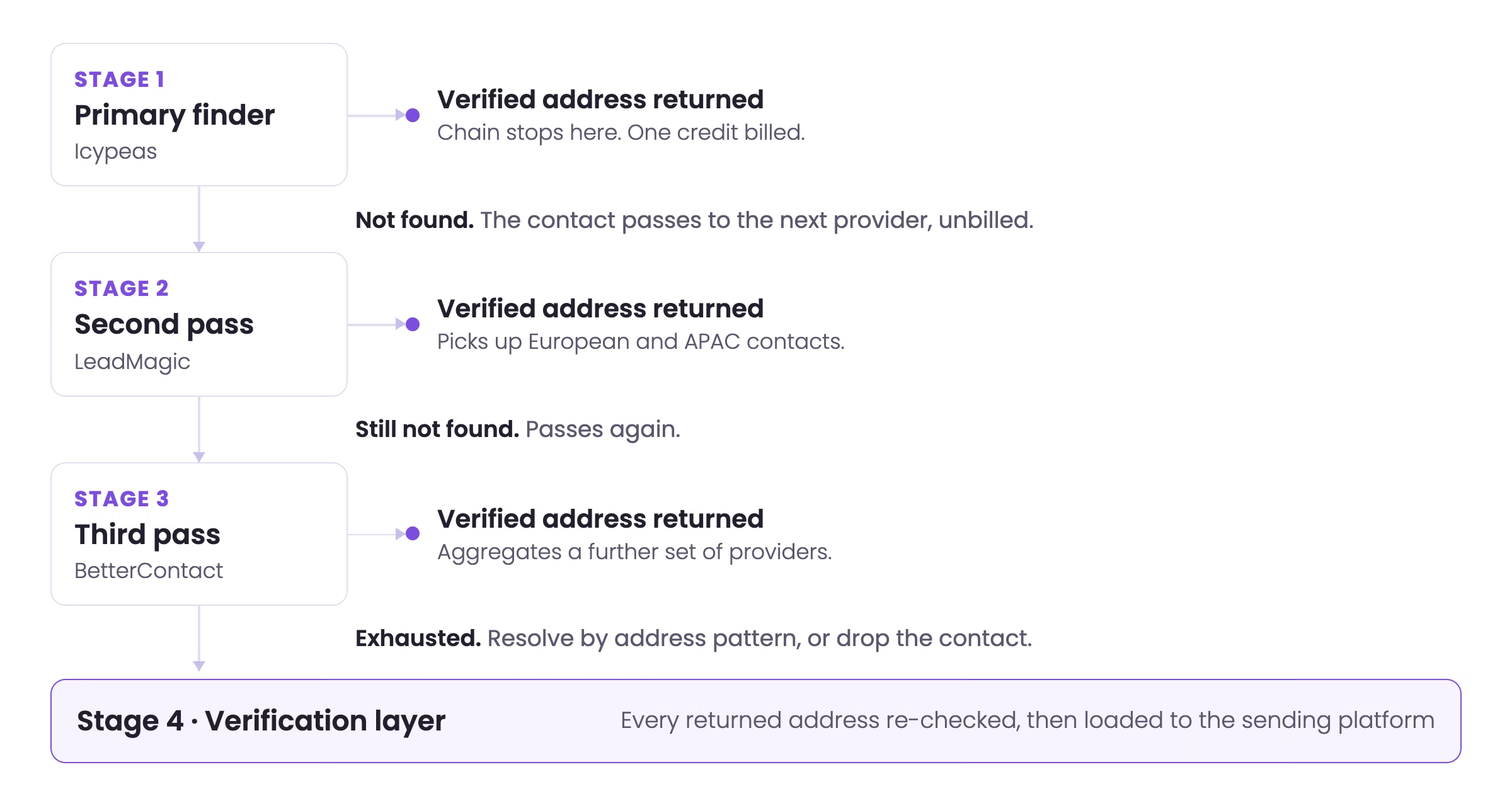
The lookup goes to the first provider. A verified hit ends the chain and nothing else is billed. A miss passes the contact to the second provider, then the third, then a verification layer over whatever came back. Because most finders bill only for a verified result, the coverage compounds while the cost per contact stays close to a single lookup.
The stack Reachly runs, in order:
- Icypeas as the primary finder, with code REACHLY on the plan.
- LeadMagic as the second pass, which picks up European and APAC contacts the primary misses.
- BetterContact as the third pass, aggregating a further set of providers in one call.
- ZeroBounce as the verification layer over everything that came back.
The whole chain is orchestrated inside Clay, which also attaches the enrichment and signal columns before the list ever reaches a sending platform. Findymail is a strong single-provider alternative when you would rather not build a chain, since it verifies before it bills.
Wiring that chain once is straightforward. Keeping it running as signals change, providers disagree, and volume grows is what a GTM engineer does all day.
| Approach | Human time | What you pay for | Fails when |
|---|---|---|---|
| Manual profile checks | A full working day or more | Nothing in cash | The list passes about 50 contacts |
| Browser extension, one by one | Several hours | One credit per lookup, hit or miss | The list passes about 100 contacts |
| Single bulk finder | Minutes | One credit per contact | The provider has never seen a contact |
| Provider waterfall | Minutes | Usually one verified result per contact | Nothing much, beyond catch-all domains |
How does Sales Navigator help you find work emails?
Sales Navigator returns no email addresses. What it returns is the list worth looking up, and that distinction decides whether the lookup was worth paying for.
Method 12. Filter first, then enrich the saved search
The filters are the product: job changes inside the last ninety days, headcount growth, recent funding, technologies in use, company size, and members who posted in the last thirty days. Save the search, export it, and run the export through the waterfall. Core is listed at $119.99 a month or $1,079.88 a year and includes 50 InMail credits.
A seat pays for itself on a single campaign when the filters narrow a list enough to change the message. Our breakdown of Sales Navigator search filters covers the combinations that produce a segment worth writing to.
Which buying signals should filter the list before you look up an email?
A verified address sent to the wrong person still costs you the reply and a piece of your sending reputation. Signals decide who belongs on the list, and they are cheaper to apply before the lookup than after it.
The signals that hold up across campaigns:
- A job change in the last 90 days, which brings a new mandate and usually a new budget.
- A funding announcement in the last 60 days.
- Headcount growth above 20% year over year, or a run of open roles in the function you sell to.
- A public post about the problem you solve, inside the last 30 days.
- A technology change relevant to your offer.
- A named visitor to your own website who never filled in a form.
This is the whole of signal-based outbound. Primal, a marketing services firm, ran evergreen campaigns to CMOs and CEOs alongside signal campaigns triggered on hiring, funding and search ranking drops, and reached an 8% positive reply rate, 85 sales qualified leads in six months, a 35% reduction in cost of acquisition and 4.57x return on spend. The numbers are in the Primal case study.
How do you verify a LinkedIn email before you send?
Every address gets verified, whether a finder returned it, Google surfaced it or you generated it from a pattern. Contact data decays as people change jobs, so an address confirmed three months ago is a guess today.
Bounce rate is the reason. Past roughly 3%, mailbox providers begin filtering the sending domain, and the damage follows the domain rather than the list that caused it. One unverified thousand-contact file can undo a month of warm-up in a morning.
1.  Verify every address     ZeroBounce or MillionVerifier, inside 48h of send
2.  Keep                     valid only
3.  Cut                      role accounts: info@ support@ admin@ hello@ sales@
4.  Cut                      catch-all domains the verifier cannot confirm
5.  Cut                      every prior hard bounce, unsubscribe and complaint
6.  Cut                      anyone outside the target persona, verified or not
7.  Cut                      anyone with no live buying signal in the last 90 days
8.  Check                    bounce rate projection under 3% before launch
9.  Suppress                 permanently, across every future campaign
10. Re-verify                any list older than 30 days before reuse
Steps 5 and 9 are the ones teams skip, and they are the ones that compound. A suppression list that lives in one campaign rather than across the account will let the same bad address bounce every quarter. Our guide to email verification for cold email covers the tooling in detail.
Is it legal to find emails from LinkedIn?
Finding a business email address is legal in the United States, the EU and the UK. The obligations attach to what you do next, and they differ by region rather than by how you found the address.
| Rule | Applies to | What it requires | Source |
|---|---|---|---|
| GDPR Article 6(1)(f) | EU and UK recipients | A documented legitimate interest, plus a balancing test against the recipient's rights | eur-lex.europa.eu |
| GDPR Article 14 | EU and UK recipients | Telling the person where their data came from, within a month of first contact | eur-lex.europa.eu |
| CAN-SPAM | US recipients | Accurate headers and subject, a valid postal address, and an opt-out honored within 10 business days | ftc.gov |
| CASL | Canadian recipients | Express or implied consent before the first message, and sender identification in it | fightspam.gc.ca |
| LinkedIn User Agreement | Everyone using LinkedIn | No bots or automated methods to copy profiles or data from the platform | linkedin.com/legal/user-agreement |
The platform rule is the one people conflate with the law. In April 2022 the Ninth Circuit held in hiQ Labs v. LinkedIn that scraping publicly accessible pages is unlikely to violate the Computer Fraud and Abuse Act. In November 2022 a district court found that hiQ had nonetheless breached LinkedIn's User Agreement, and the parties settled. A contract can bind you where a statute does not, which is why sourcing through providers that hold their own licensed databases is the safer build.
One practical consequence for GDPR: the Article 14 notice belongs in the first email rather than in a privacy policy nobody opens. A single line naming where you found them satisfies it and tends to read better than a generic opener.
What does the full LinkedIn email workflow look like?
The 12 methods assemble into one sequence. Two of these steps deserve real human attention and the rest should run without you.
- Define the segment and pick the buying signal that qualifies someone for it.
- Build the list in Sales Navigator, or with an X-ray search if you have no seat.
- Run the four free profile checks on the small number of accounts that matter most.
- Export the rest and push the file into Clay.
- Run the finder waterfall across Icypeas, LeadMagic and BetterContact.
- Resolve the remainder by pattern, verified against a known address at the same domain.
- Verify everything through ZeroBounce or MillionVerifier.
- Run the ten-step scrub and hold the projected bounce rate under 3%.
- Load the survivors into your sending platform on dedicated secondary domains.
- Sequence across cold email, LinkedIn and cold calling rather than one channel alone.
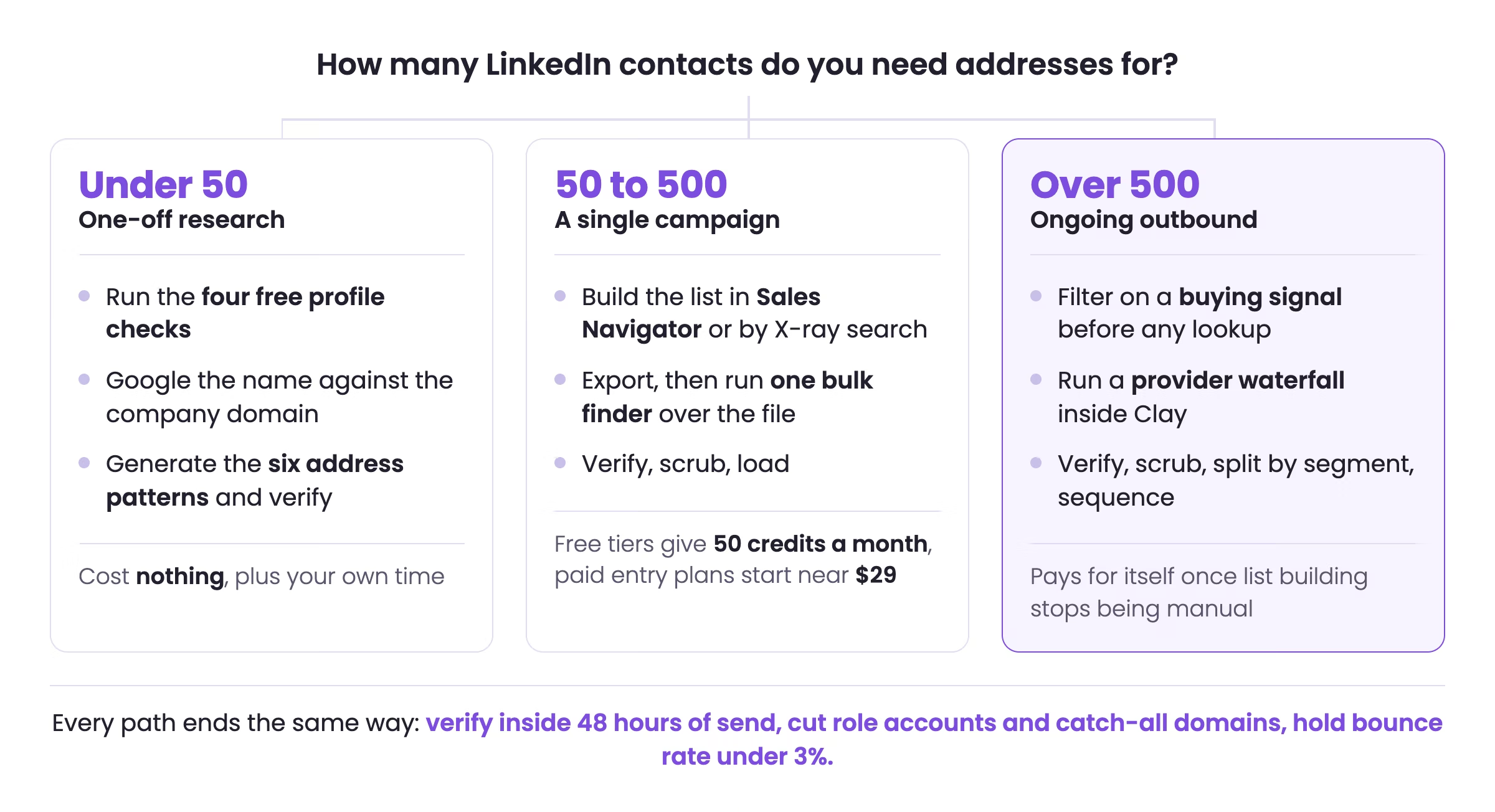
Steps 1 and 10 are where the outcome is decided. The eight steps in between are mechanical, and any hour spent on them by hand is an hour not spent on the targeting or the offer.
Skip the list building and get the meetings instead
Reachly maps your total addressable market, attaches the buying signals, finds and verifies every address, then runs the campaigns across cold email, LinkedIn and cold calling on dedicated infrastructure and handles every reply until a meeting is booked. Flat monthly retainer from $3,500, first meetings within 10 days on pre-warmed domains, or 5 to 6 weeks from kickoff on branded domains.
See how it works
How to find LinkedIn emails FAQ
How do you find someone's email on LinkedIn for free?
Check the Contact info panel under the profile headline first, then the banner image, then the end of the About section and any lead magnet in Featured. Those four checks cost nothing and take about ten seconds. For people already in your network, request your LinkedIn data export under Settings and Privacy, Data privacy, Get a copy of your data, and select Connections. LinkedIn returns a CSV holding the email each connection had on file when they accepted you, which is the single largest free source of addresses most people never use.
Does LinkedIn show people's email addresses?
Only when the member has chosen to publish one and you are already a first-degree connection. LinkedIn treats the email field as private by default and shows it inside the Contact info panel, which is the small link sitting under the headline. Members can restrict it to connections, to nobody, or leave it unset entirely, and most senior decision makers do restrict it. Everyone else has to work the address out from public data or look it up through a finder.
Can you find out someone's email from LinkedIn without connecting?
Yes. The profile gives you the full name, the current employer and often the location, which is everything an email finder needs to resolve and verify a work address. You can also run a Google site search against the company domain, or generate the six standard address patterns and verify each one. None of that requires a connection request, and none of it depends on the member sharing anything in Contact info.
How do you find work emails from LinkedIn in bulk?
Export the target list from LinkedIn Sales Navigator or a scraper, then run it through a finder rather than looking people up one at a time. A waterfall sends each unresolved contact to a second and third provider, so contacts one database has never seen still get resolved. Verify what comes back, cut role accounts and unverifiable catch-all domains, then load the survivors into your sending platform. A thousand-contact list takes minutes rather than the day it takes by hand.
What is a LinkedIn email finder waterfall?
A waterfall is a chain of email providers queried in order. The first provider tries the lookup, and a verified hit ends the chain. Anything it misses passes to the second provider, then the third. Because most finders only bill for a verified result, you pay once per contact while getting the combined coverage of several databases. Clay is the usual place to orchestrate one, and Icypeas, LeadMagic and BetterContact are the providers Reachly stacks.
Which email pattern do most companies use?
There are six patterns that cover almost every B2B domain: first.last, first, flast, firstl, first_last and last.first, each followed by the company domain. Rather than guessing which one a company uses, generate all six for one known employee, run them through a verifier, and keep whichever returns valid. That pattern then applies across the whole company, so one verification pass resolves every other contact at that domain.
Is it legal to find emails from LinkedIn?
Finding a business email address is legal in the United States, the EU and the UK, and the rules attach to what you send rather than to the lookup. Under GDPR, B2B outreach normally runs on the legitimate interest basis in Article 6(1)(f), and Article 14 requires you to tell the person where you got their data within a month of first contact. CAN-SPAM requires accurate headers, a valid postal address, and an opt-out honored within ten business days. Canada's CASL is stricter and requires express or implied consent before the first message. Automated scraping of LinkedIn is a separate question and is banned by LinkedIn's own User Agreement regardless of what data protection law allows.
Is scraping LinkedIn against the terms of service?
Yes. LinkedIn's User Agreement prohibits using bots or automated methods to copy profiles, and the platform enforces it with account restrictions. That is separate from the legal position on the data itself. The Ninth Circuit held in hiQ Labs v. LinkedIn in April 2022 that scraping publicly accessible pages is unlikely to violate the Computer Fraud and Abuse Act, and a district court then found in November 2022 that hiQ had breached the User Agreement, with the parties settling. The practical read is that the contract binds you even where the statute does not, so source data through providers that hold their own licensed databases.
How accurate are LinkedIn email finder tools?
Accuracy varies by provider, by region and by how obscure the domain is, and no independent benchmark covers the whole market. What you can rely on is the billing model. Findymail, Icypeas and LeadMagic bill only for a result they have verified, and Findymail publishes a bounce rate guarantee below 5%. Treat every returned address as a candidate rather than a fact, run a final verification pass before the campaign launches, and hold bounce rate under 3% across the send.
What is the best free LinkedIn email finder extension?
Hunter and Skrapp both run a free tier at 50 credits a month, which covers roughly two lookups a working day and is enough for one-off research. Extensions sit on the profile page and return the address in place, so they suit reconnaissance rather than list building. Once a campaign needs more than about a hundred contacts, an extension becomes the slowest part of the process and a bulk finder is the better tool.
How much does it cost to find emails from LinkedIn?
Published entry pricing in 2026 runs from free to about $99 a month. Hunter and Skrapp both give 50 credits a month at no cost. Skrapp's Professional plan is $29 a month on annual billing for 2,000 credits, which works out near $0.015 per credit. Hunter's Starter plan is $49 a month for 2,000 credits. Findymail's Starter plan is $99 a month for 5,000 finder credits plus 5,000 verifier credits, close to $0.02 per verified email, and only charges for results it can verify.
Do you need LinkedIn Sales Navigator to find emails?
No, and Sales Navigator does not return email addresses in the first place. What it gives you is the filtered list worth looking up: job changes in the last ninety days, headcount growth, recent funding, technology in use, and members who posted recently. Core is listed at $119.99 a month, or $1,079.88 annually, and includes 50 InMail credits. The seat pays for itself when it narrows a list enough that the emails you find are worth sending to.
How do you verify a LinkedIn email before sending?
Run every address through a verifier such as ZeroBounce or MillionVerifier within 48 hours of the send, because contact data decays as people change jobs. Keep the addresses that come back valid, cut role accounts like info@ and support@, and treat catch-all domains as unverifiable rather than valid, since a catch-all server accepts everything and confirms nothing. Suppress every previous hard bounce, unsubscribe and complaint permanently.
What bounce rate should a LinkedIn-sourced list stay under?
Under 3%. Above that, mailbox providers start filtering the sending domain, and the damage carries across every campaign on that domain rather than staying with the bad list. Bounce rate is the reason verification is worth the step it costs: an unverified list of a thousand contacts can put a warmed domain back to the start of its warm-up cycle in a single morning.
How long does it take to build a verified list from LinkedIn?
About an hour of human work for a thousand contacts, most of it spent on the filters rather than the lookup. Building the Sales Navigator search and choosing the buying signal takes the longest. The export, the finder waterfall and the verification pass run in minutes, and the scrub is a set of saved rules. The pattern to avoid is the inverse, where a team spends a day hunting addresses one at a time and picks the targeting in five minutes.
Recommended service
LinkedIn Outreach Agency
Reachly runs signal-led LinkedIn campaigns that open conversations with your ICP, from targeting through follow-up.










