

- Follow ups carry 44% of all positive replies, and the first follow up alone carries 26%, across Saleshandy's 53 million email dataset.
- Four to six follow ups over 20 to 21 days, with the gap widening from three days to eight rather than repeating on a fixed clock.
- Five checks belong in front of every automated send: reply, bounce, suppression, out of office and the sending window.
- Hold each mailbox at 12 to 15 sends a day and add mailboxes to raise volume. Rotate a mailbox out above 2% bounce.
- Reachly builds and runs these sequences for you. See our cold email agency page.
Automated email follow ups are the second, third and later messages a sequencer sends on its own after the opening email gets no reply, stopping the moment the prospect responds. They carry 44 percent of every positive reply a cold email campaign produces, according to Saleshandy's analysis of 53 million emails, and the first follow up alone accounts for 26 percent. Automation matters because that share is only available to teams that send every step on time, and the sequences that hold up in 2026 are the ones whose stop conditions are as carefully built as their send conditions.
TL;DR: Summary
- Follow ups produce 44 percent of all positive replies, and the first one alone produces 26 percent, on Saleshandy's 53 million email dataset. Woodpecker's campaign research found that adding even one follow up raised the reply rate by 22 percent.
- Four to six follow ups across 20 to 21 days is the shape the published datasets converge on. Automate the gaps as widening, not identical: three days, then four, then six, then eight.
- A sequencer is a set of rules about when not to send. Reply detection, bounce handling, suppression lists, sending windows and a hard step cap do more for reply rates than any subject line test.
- Send volume per mailbox is the constraint that decides everything else. Keep it at 12 to 15 emails a day per inbox and add mailboxes rather than raising the per-inbox number.
- Automating follow ups inside Gmail or Outlook alone works up to a few dozen prospects a day. Past that the missing pieces are reply detection across mailboxes, a shared suppression list, and per-domain sending caps.
- Track reply rate, positive reply rate, bounce rate and meetings per 1,000 sent. Bounce above 2 percent means stop sending and fix the list before touching the copy.
- Reachly builds and runs these sequences as a managed service. Primal generated 85 sales qualified leads in six months at 4.57x return on spend and an 8 percent positive reply rate. See our cold email agency page.
What are automated email follow ups, and what does the software decide for you?
An automated follow up is a message queued in advance against a condition. You write the step once, set the gap and the rules, and the sequencer sends it to every prospect who has not replied by the time the gap closes. The prospect sees one person writing again. The system sees a queue it checks several times an hour.
Three decisions move from a person to the software the moment you automate, and each one is a place where campaigns quietly break.
The first is whether to send at all. The sequencer checks for a reply, a bounce, an unsubscribe, a suppression match and an out of office before every step. Miss any of those checks and you write to someone who already answered.
The second is when to send. Every step carries a gap in days and a sending window in the prospect's timezone. Left at defaults, sequencers fire identical gaps at identical minutes, which is the clearest tell that nobody is at the keyboard.
The third is how much to send. Per-mailbox daily caps, warm-up state and rotation across sending domains decide how many of your queued steps actually leave the building on a given day. A sequence that looks fine in the builder can still stall because the mailboxes behind it are at their limit.
The strategy behind the sequence, how many touches to run and what each one should say, sits in our cold email follow up playbook. This page covers the machine that executes it. For the definition of cold email and the whole system around it, see what is cold email.
How many automated follow ups should a sequence send, and how far apart?
Reachly’s own client campaigns run shorter: two emails, five to six days apart, so one follow up. The follow up that earns the most replies asks “Would this be something of interest, or does {subject} sit with {colleague_name}?” Anyone who has not replied by then moves to LinkedIn.
Four to six follow ups after the opener, spread across 20 to 21 days. That is the range Saleshandy's dataset of 53 million emails identifies in its highest performing sequences, and it lines up with Woodpecker's campaign research, which found that adding even one follow up raised the reply rate by 22 percent.
The gap between steps should widen as the sequence runs. A prospect who has ignored four messages is not going to be moved by a fifth arriving on the same three day clock, and tight late-stage gaps are what generate complaints. Saleshandy found decision makers responded best to contact every two to three days while managers tolerated 24 to 48 hours, so seniority sets which end of each range you automate.
| Step | Day | Gap | What the automation checks | Job of the message |
|---|---|---|---|---|
| Opener | Day 0 | n/a | Verified email, mailbox under daily cap, sending window open | One problem, one ask |
| Follow up 1 | Day 3 | 3 days | No reply, no bounce, no out of office still active | Reframe the problem in one line |
| Follow up 2 | Day 7 | 4 days | No reply, LinkedIn touch logged, suppression list clean | New proof or a number they track |
| Follow up 3 | Day 13 | 6 days | No reply, engagement flag from opens or clicks | Lower the ask to a question |
| Follow up 4 | Day 21 | 8 days | No reply, step cap reached after this send | Close the file and leave the door open |
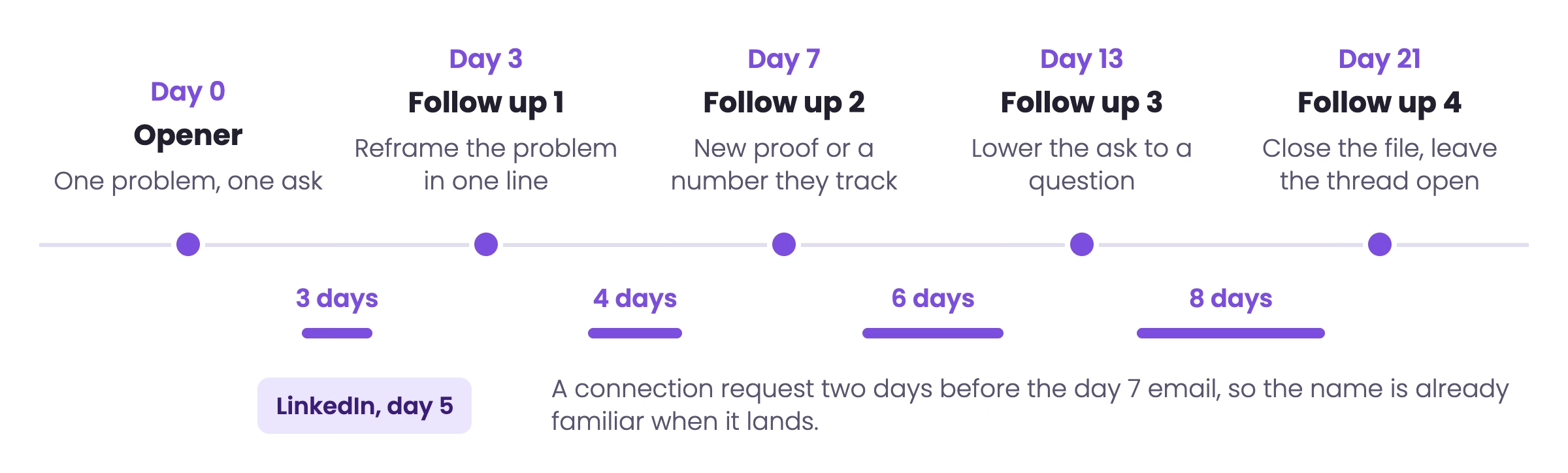
Two things in that table are worth setting deliberately rather than accepting from a template. The day 21 step is the last one, enforced by a hard cap in the sequencer, because past seven total touches unsubscribes and complaints climb faster than replies do. And the day 7 row assumes a LinkedIn touch has already landed, which changes what that email can open with. The per-step timing logic in more detail sits in our cold email follow up guide.
Which triggers should start an automated follow up?
Time is the default trigger and the weakest one. A step that fires purely because four days elapsed says nothing the prospect can use. A step that fires because their company posted three sales roles last week arrives with a reason to exist.
In practice a working sequence mixes both. Time keeps the cadence honest, and signals decide which branch the prospect takes and what the next message leads with.
| Trigger type | Signal the system watches | What the next step should do | Source of the signal |
|---|---|---|---|
| Time | Gap in days since the last send, in the prospect's timezone | Send the next written step unchanged | Sequencer schedule |
| Engagement | Repeat opens or a click with no reply | Shorten the next gap and make the ask smaller | Sequencer tracking |
| Hiring | Open roles posted in the function you sell into | Open on the role and what it implies about the team | Job boards, Clay |
| Funding | New round announced in the last 90 days | Open on the round and the spending that usually follows it | Crunchbase, Clay |
| Headcount | Team growth above 10 percent in a quarter | Open on the growth and the process strain behind it | LinkedIn, Clay |
| Channel | LinkedIn connection accepted or profile viewed | Reference the channel switch in one clause, then continue | HeyReach, sequencer |
| Negative | Out of office, role change, unsubscribe | Pause, reroute to a colleague, or stop permanently | Reply parsing |
Signal enrichment is where the data layer earns its cost. We map the total addressable market across more than ten sources, then attach the signals above to each account so a follow up can reference something that happened this month. Tools like Clay handle the enrichment step if you are building this in house.
Building it in house puts the work squarely in GTM engineering territory. Someone has to own the enrichment waterfall, the signal logic, and the sending layer as a single system, and keep it accurate as providers drift and volume grows.
One rule keeps signal-based automation from backfiring. A signal must be something the prospect would agree is true and would expect a vendor to have noticed. Public hiring, public funding and public headcount pass that test. Inferred intent from a third-party pixel usually does not, and referencing it reads as surveillance rather than research.
Which conditions should stop the sequence automatically?
Stop conditions are the half of automation nobody writes about, and they are where the damage happens. A sequence that keeps sending after a reply costs you the meeting you already earned. A sequence that keeps sending after a hard bounce costs you the sending domain.
Five checks belong in front of every automated send, and every one of them should be able to halt the queue on its own.
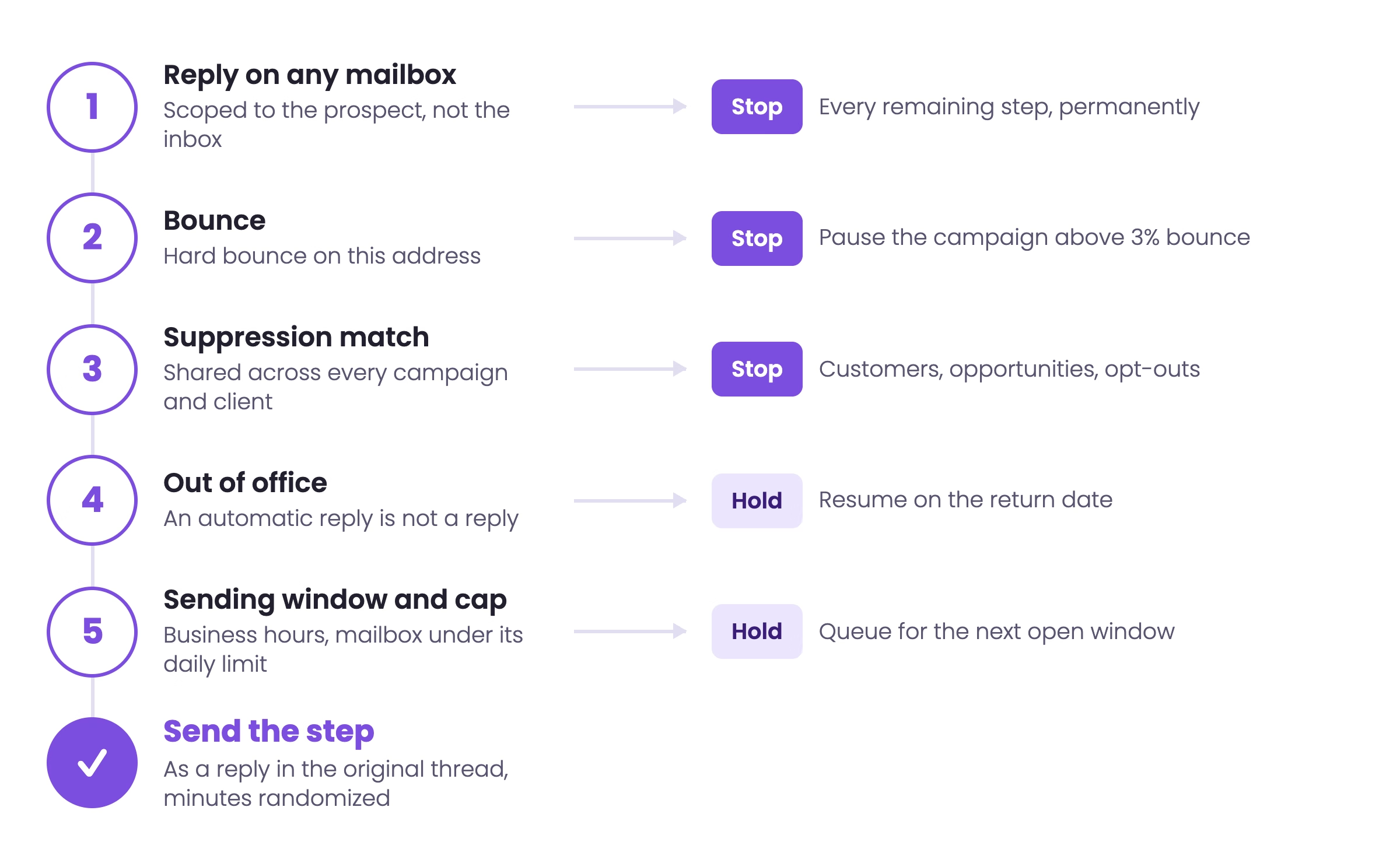
Reply detection across every mailbox. If you rotate five inboxes, a reply to any one of them has to stop the whole sequence for that prospect. Reply detection scoped per mailbox rather than per prospect is the most common cause of the message everyone dreads, the follow up that arrives after somebody already said yes.
Bounce handling with a campaign-level circuit breaker. Stop the individual prospect on a hard bounce, and stop the whole campaign when the rate crosses 3 percent. Continuing past that point trades a fixable list problem for an unfixable reputation problem.
A suppression list shared across every campaign and client. Unsubscribes, current customers, live opportunities, competitors and anybody who asked to be left alone belong in one list that every sequence checks, permanently, not per campaign.
Out of office parsing that pauses rather than stops. An automatic reply is not a reply. The correct behavior is to hold the sequence, read the return date if the message contains one, and resume after it. Treating an out of office as a real reply drops prospects who never saw the email.
A hard step cap. Whatever the branching logic does, the sequence ends after the number of touches you decided in advance. Branches that add steps conditionally are how a five step sequence becomes an eleven step one nobody signed off on.
Reply parsing deserves one extra note. Sequencers classify replies as interested, not interested or out of office, and the classification is roughly right rather than reliably right. Route every classified reply to a human before the system acts on it, especially the negatives, because a misclassified "not now, ask me in Q3" is a lost pipeline entry.
What does an automated five step follow up sequence look like?
Below is a complete sequence written for automation rather than for a single send. Each step names its gap, its stop conditions and the merge fields it needs, so it can be loaded into a sequencer as written. Keep every follow up under 80 words with one ask, and keep the whole sequence in one thread so the prospect can read the history.
STEP 1  OPENER            day 0
SUBJECT: {{first_name}}, {{signal_short}}
STOP IF: bounce, unsubscribe, suppression match

Hi {{first_name}},

Saw {{company}} {{signal_detail}}. Teams doing that
usually hit the same wall: {{problem}}.

We fixed that for {{peer_type}} by {{mechanism}},
and it took them from {{before}} to {{after}}.

Worth 15 minutes to see if the same applies here?

{{sender_first_name}}


STEP 2  FOLLOW UP 1        day 3   (gap 3 days)
SUBJECT: (reply in thread, no new subject)
STOP IF: any reply, bounce, unsubscribe
PAUSE IF: out of office, resume on return date

Hi {{first_name}},

Short version of the last one: {{problem}} is
usually a {{root_cause}} problem, not a
{{surface_cause}} one.

If that is not what is on your desk this quarter,
say so and I will stop here.

{{sender_first_name}}


STEP 3  FOLLOW UP 2        day 7   (gap 4 days)
SUBJECT: (reply in thread)
STOP IF: any reply, bounce, unsubscribe
ASSUMES: LinkedIn connection sent on day 5

Hi {{first_name}},

One number in case it is useful: {{peer_type}} we
work with sit at {{benchmark}} on {{metric}}.

Most teams find they are {{gap_direction}} that and
had no baseline to compare against.

Happy to send how it is calculated, no meeting
needed.

{{sender_first_name}}


STEP 4  FOLLOW UP 3        day 13  (gap 6 days)
SUBJECT: (reply in thread)
STOP IF: any reply, bounce, unsubscribe
BRANCH: if opened 2+ times, shorten gap to 4 days

Hi {{first_name}},

Is {{problem}} owned by you, or does it sit with
{{adjacent_role}}?

Asking so I stop writing to the wrong person.

{{sender_first_name}}


STEP 5  FOLLOW UP 4        day 21  (gap 8 days)
SUBJECT: (reply in thread)
STOP IF: any reply. Hard step cap: sequence ends here.

Hi {{first_name}},

Closing the file on this one so it stops sitting in
your inbox.

If {{problem}} becomes a priority later, reply to
this thread and I will pick it up from here.

{{sender_first_name}}
Two notes on loading this. The merge fields with a signal in them ({{signal_short}}, {{signal_detail}}) must have a fallback value or the step will send with an empty gap in the sentence, which is worse than a generic line. And step 3 assumes a LinkedIn touch landed two days earlier, so if you are running email only, cut the benchmark offer down to one sentence. Nine follow ups written out per ICP and sequence position sit in our cold email follow up templates library.
How do you keep automated follow ups out of the spam folder?
Automation raises volume, and volume is what mailbox providers judge. The same sequence that returns 8 percent replies from 40 sends a day per inbox can return almost nothing from 150, because the second version never reaches the inbox. The settings below are the ones that decide it.
| Guardrail | Setting that holds up | Why the automation needs it |
|---|---|---|
| Daily volume | 12 to 15 emails per mailbox per day | Providers rate-limit by mailbox, so add inboxes rather than raising the cap |
| Warm-up | Four weeks before a new mailbox joins a live campaign | A cold mailbox at full volume gets filtered within days |
| Sending domains | Secondary domains only, never the company's main domain | Keeps a reputation problem away from invoices and support mail |
| Authentication | SPF, DKIM and DMARC set on every sending domain | Unauthenticated mail is filtered before content is even scored |
| Rotation | Round-robin across mailboxes with per-inbox caps enforced | Spreads volume so no single mailbox looks like a bulk sender |
| List hygiene | Verified addresses only, campaign paused above 3 percent bounce | Bounce rate is the fastest way to lose a sending domain |
| Sending window | Business hours in the prospect's timezone, randomized minutes | Identical send times across thousands of prospects read as automation |
| Thread behavior | Follow ups as replies in the original thread | Keeps the history visible and reduces new-thread filtering |
Infrastructure is worth naming specifically. Dedicated secondary domains with their own warm-up are part of every campaign we run, which is what lets a client push volume without putting their primary domain at risk. Zapmail handles domain and mailbox provisioning if you are assembling this yourself, and the mechanics of spreading volume across inboxes are in our inbox rotation guide. For the authentication records themselves, our cold email deliverability guide has the full setup.
Have the sequences built, sent and answered for you
We map your total addressable market, attach buying signals, run the follow ups across email, LinkedIn and phone, and hand you the replies. Flat monthly retainer from $3,500, first meetings within 10 days on pre-warmed domains, or 5 to 6 weeks from kickoff on branded domains.
See how it worksWhich tools run automated email follow ups, and how do they differ?
Three categories of software send automated follow ups, and they fail at different volumes. Picking by category first saves a migration later.
| Category | Examples | Where it holds up | Where it breaks |
|---|---|---|---|
| Cold outreach sequencer | Smartlead, Instantly, Saleshandy, Woodpecker, Lemlist | Multi-mailbox rotation, warm-up, reply detection, thousands of prospects a month | Weak native CRM records, so pipeline reporting needs a sync |
| CRM-native sequences | HubSpot sequences, Salesforce cadences, Pipedrive campaigns | One record per prospect, clean attribution, sales team already lives there | Sends from the primary domain and caps out well below cold outreach volume |
| Mail-merge add-on | GMass, Mailmeteor, Mixmax, Mailshake | One or two mailboxes, a few dozen sends a day, no infrastructure to run | No domain rotation, no shared suppression, reply detection per mailbox only |
For B2B cold outbound at real volume the sequencer category is the only one that holds. We run Smartlead for email because mailbox rotation and reply detection are handled properly, HeyReach for the LinkedIn steps in the same sequence, and Clay for the enrichment and signal layer that feeds both. The CRM stays the record of truth, with replies and meetings synced back into HubSpot or Salesforce.
The category question that actually matters is not which brand sends the email. It is whether the tool can hold a suppression list, a reply state and a volume cap across every mailbox at once. A tool that cannot do those three things will produce a follow up to somebody who already replied, and no amount of copy work compensates for that.
How do you automate follow ups in Gmail or Outlook without a sequencer?
It works, up to a point, and the point is roughly a few dozen prospects a day from a single mailbox. Below that ceiling a mail-merge add-on gives you scheduled steps that stop on reply, which is most of the value.
In Gmail the practical route is an add-on such as GMass or Mailmeteor driving a Google Sheet of prospects, with follow ups configured as replies in the same thread and a stop-on-reply rule set per campaign. Native Gmail templates plus scheduled send will not do it, because nothing cancels the queued message when the prospect answers.
In Outlook the equivalent is a Microsoft 365 mail-merge tool, or Power Automate driving a sequence off a list, with the same stop-on-reply condition. Outlook's own delayed delivery and follow up flag are reminders for you, not sends to the prospect, which is the usual source of confusion.
Three limits arrive together once you pass that ceiling. Reply detection stays scoped to the one mailbox, so nothing stops a sequence when the prospect answers a colleague. There is no shared suppression list, so two people can sequence the same account in the same week. And every send comes from your primary domain, so a bounce problem lands on the address your invoices go out from. Those three limits, not the send volume itself, are the reason teams move to a sequencer.
Which automation mistakes cost the most replies?
The failures below come up in almost every campaign audit, and none of them are copy problems.
Identical gaps between every step. Four days, four days, four days is a pattern a prospect can feel. Widening gaps read as a person who is still interested but not sitting on your inbox.
Volume raised per mailbox instead of per campaign. Doubling a mailbox from 40 to 80 sends a day does not double replies. It moves the campaign into the spam folder and takes the sending domain with it.
Follow ups that only add pressure. A step whose entire content is asking again gives the prospect nothing new to react to. Every step needs one new thing: a number, a reframe, a smaller ask.
Personalization fields with no fallback. An empty merge field ships a sentence with a hole in it, and it ships to everyone whose enrichment failed. Set a fallback per field and test the sequence against records with deliberately missing data.
Suppression scoped to the campaign. Unsubscribes and live opportunities have to be suppressed across every campaign you run, permanently. Per-campaign lists are how a customer receives cold outreach.
Branching with no step cap. Conditional steps that add touches for engaged prospects will happily push a sequence past ten messages. Cap the total in the sequencer, not in the plan.
Nobody reading the replies. Automation ends at the reply. A campaign returning 8 percent replies with a two day response lag converts worse than one returning 5 percent answered within the hour.
What should you measure once your follow ups are automated?
Four numbers tell you whether an automated sequence is working, and one of them is a stop sign rather than a target.
| Metric | Healthy range | What it tells you | Source |
|---|---|---|---|
| Reply rate | 3.7 percent average, 8 percent-plus on tight segments | Whether the offer and the list match | Saleshandy, 53M emails |
| Positive reply rate | 3 to 5 percent of sends | Whether the replies are worth having | Saleshandy, 53M emails |
| Share of replies from follow ups | About 44 percent of positive replies | Whether the later steps are pulling their weight | Saleshandy, 53M emails |
| Reply lift from follow ups | Plus 22 percent from adding one follow up | What the sequence is worth against a single send | Woodpecker campaign research |
| Bounce rate | Under 2 percent, rotate the mailbox out above it | List quality, and the health of the sending domain | Reachly operating standard |
| Segment size | Under 200 prospects per campaign returns 15 to 20 percent replies | Whether the segment is tight enough to say something specific | Saleshandy, 53M emails |
| Meetings per 1,000 sent | Tracked per campaign, compared month over month | The only number that survives a board meeting | Reachly reporting |
Read them in that order. A campaign with a healthy reply rate and a poor positive reply rate has a targeting problem. A campaign with a healthy positive reply rate and few meetings has a reply handling problem. And a campaign with a bounce rate above 3 percent has neither, until the list is fixed.
One caution on step-level reporting. Sequencers attribute a reply to the step that was sent last, which credits later steps with replies the earlier ones set up. Judge steps on whether removing them lowers the sequence total, not on their individual attributed share.
The outcome numbers we hold to look like this. Primal generated 85 sales qualified leads in six months across evergreen and signal-based campaigns, at an 8 percent positive reply rate, 4.57x return on spend and a 35 percent reduction in cost of acquisition. The Great Room went from roughly two meetings a quarter to two a month, closing more than $250,000 in contract value about nine months in.
Automated email follow ups FAQ
What are automated email follow ups?
Automated email follow ups are follow up messages a sequencer sends on its own after an initial email gets no reply, on a gap you set in advance, stopping automatically when the prospect replies, bounces or unsubscribes. The prospect receives what looks like one person writing again, and the system handles the scheduling, the reply detection and the volume limits behind it.
How many automated follow ups should I send?
Four to six follow ups after the opener, which is five to seven total touches. Saleshandy's analysis of 53 million emails found its highest performing sequences ran four to six follow ups across 20 to 21 days, and Woodpecker's campaign research found that adding even one follow up raised the reply rate by 22 percent. Above seven touches, unsubscribes and complaints rise faster than replies.
How long should the gap between automated follow ups be?
Start at three days and widen: three, then four, then six, then eight. Saleshandy found decision makers responded best to contact every two to three days while managers tolerated 24 to 48 hours, so seniority decides which end of the range you use. Identical gaps between every step are the clearest signal that the sequence is automated.
Do automated follow ups actually get replies?
Yes, and they carry most of the positive ones. Saleshandy attributes 44 percent of all positive replies to follow ups rather than the opening email, with the first follow up alone accounting for 26 percent. Woodpecker's campaign research found that adding even one follow up raised the reply rate by 22 percent.
Should an automated follow up be a reply in the same thread or a new email?
A reply in the same thread, for the whole sequence. The prospect can read the history without opening anything else, and a growing thread from one sender behaves better with mailbox filters than a series of new subjects to the same address.
What should stop an automated sequence?
Any reply, a hard bounce, an unsubscribe, a suppression list match, and the step cap you set in advance. An out of office should pause the sequence and resume it after the return date rather than end it, because the prospect never saw the message.
How do I stop follow ups sending after someone already replied?
Scope reply detection to the prospect rather than the mailbox. If you rotate several inboxes, a reply to any one of them has to halt every remaining step for that prospect across the whole campaign. Reply detection configured per mailbox is the usual cause of a follow up arriving after somebody said yes.
Can I automate follow ups in Gmail or Outlook?
Up to a few dozen prospects a day from one mailbox, using a mail-merge add-on such as GMass or Mailmeteor in Gmail, or a Microsoft 365 mail-merge tool or Power Automate in Outlook, with a stop-on-reply rule set per campaign. Native scheduled send and follow up flags will not work, because nothing cancels the queued message when the prospect answers.
How many emails a day can I send per mailbox?
Keep it at 12 to 15 after a four week warm-up. Providers rate-limit by mailbox, so the way to raise campaign volume is to add mailboxes and rotate across them, not to raise the per-inbox number. Pushing a single mailbox to 100-plus sends a day is the fastest route to the spam folder.
Do automated follow ups hurt deliverability?
Only through volume and list quality. Follow ups sent as replies in an existing thread, from a warmed secondary domain with SPF, DKIM and DMARC set, at 12 to 15 sends per mailbox per day, behave well. Bounce rate above 2 percent is the point to pause the campaign and fix the list before sending anything else.
What personalization can be automated without sounding robotic?
Anything the prospect would agree is public and current: a role they are hiring for, a funding round, headcount growth, a market they just entered. Set a fallback for every merge field and test the sequence against records with missing data, because an empty field ships a sentence with a hole in it to everyone whose enrichment failed.
Should automated follow ups include LinkedIn and phone?
Yes, sequenced rather than simultaneous. A LinkedIn connection or profile view two days before an email step raises the chance the name is recognized, and a call belongs after the prospect has shown some engagement. The channels have to share one suppression and reply state so a prospect who replied on LinkedIn stops receiving email.
When should the sequence stop and the file close?
After the step cap you set, typically five to seven total touches across roughly three weeks. The last message should say the file is being closed and leave the thread open for a later reply, which is consistently one of the higher replying steps in a sequence.
Is it legal to send automated follow up emails?
In the United States, CAN-SPAM allows cold B2B email with accurate header and sender information, no deceptive subject line, a working opt-out and suppression within ten business days. GDPR applies to prospects in the EU and UK and needs a documented legitimate interest, a relevance test and immediate suppression on request. Automating the sequence does not change the obligations, and the suppression list has to be permanent and shared across every campaign.
Recommended service
Outbound Lead Generation Services
Reachly builds and runs the whole outbound motion across email, LinkedIn, and phone, and books qualified meetings on your calendar.










